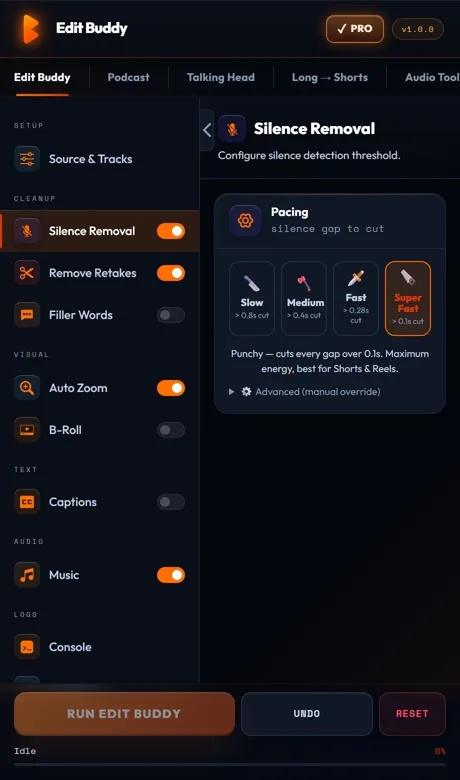
EditBuddy auto-removes dead pauses from talking head footage in Premiere Pro using platform-specific presets — YouTube (balanced), Instagram (aggressive), and Course (relaxed). Tight pacing keeps your retention curve flat, and natural breaths stay intact because every preset preserves gaps under its minimum length floor.
Silence removal for talking head videos — tight pacing, natural breath
Manual scrubbing for dead air is the worst part of editing a 20-minute YouTube video. EditBuddy does it in 90 seconds with platform-tuned defaults — and your breath patterns stay human, not robotic.
Pacing is a retention multiplier
Dead air costs you views. Here's the math creators don't usually see.
YouTube: 800 ms is the threshold
Audience retention graphs show a measurable 5–8% drop for every dead pause over 800 ms in a talking head video. Over a 12-minute video with 30 such pauses, you lose roughly 18–22% absolute retention. That's the difference between a video that gets recommended and one that gets buried.
Instagram and TikTok: 500 ms tops
Vertical short-form is brutal. Viewers swipe within half a second of any silence. The Instagram preset cuts everything over 250 ms — twice as aggressive as the YouTube preset — because that's what the platform's pacing demands.
Course content: think-time matters
Educational content is the opposite. If you cut a pause that lets the student process a concept, they lose comprehension. The Course preset keeps gaps up to 600 ms, so explanations breathe and lessons stick.
One preset switch, no manual tuning
You pick the platform; EditBuddy picks the threshold and minimum-gap. No fiddling with dB sliders, no test cuts, no second-guessing. Wrong preset? Switch and re-run — the backup sequence is preserved.
The three platform presets
Each is tuned from real-world creator feedback. You can override any value, but most editors never need to.
YouTube preset
Silence floor: -35 dB. Minimum gap: 400 ms. Keeps natural breaths and "let me think" beats. Suited for 8–20 minute talking head content. Used by most education and tutorial channels.
Instagram / Reels preset
Silence floor: -32 dB. Minimum gap: 250 ms. Aggressive pacing for 30–90 second hooks. Strips even mid-sentence pauses. Best for short-form vertical content where retention is measured in seconds.
Course / lecture preset
Silence floor: -38 dB. Minimum gap: 600 ms. Preserves think-time and natural lecture rhythm. Designed for 30+ minute educational videos where comprehension trumps pace.
Try the YouTube preset free
Install EditBuddy and clean your first talking head video in under 3 minutes. No credit card required.
Install EditBuddy →Keeping natural breath while cutting dead air
The trick isn't cutting silence — it's knowing which silence to keep.
Minimum-gap floor protects breaths
A natural inhalation between sentences is typically 250–450 ms. The YouTube preset's 400 ms floor means breaths in that range survive. Only longer dead air gets cut. You sound like a human, not a glitchy AI voice.
Noise pass handles mouth clicks
Mouth clicks, lip smacks, and short breath pops are detected separately by an audio-analysis pass that uses speech recognition confidence to spot non-speech artifacts. They get removed independently of the main silence threshold — so your cleanup is actually clean.
Re-run with one click if it feels off
Scrubbed through the result and found two cuts too tight? Drag the threshold slider, hit Auto Edit again. EditBuddy reverts the previous edit from the backup sequence and re-applies with the new settings. No undo-stack pain.
How talking head editors actually use it
Real workflows from creators who switched.
YouTube channel, 15-min videos
Record 40 minutes of raw footage, drop on V1, run silence removal at YouTube preset, then retake removal in the same panel. From record to picture-locked: roughly 8 minutes of EditBuddy time + 12 minutes of scrub-review. Used to be a 90-minute editing session.
Coach selling courses
Records 45-min lessons in one take. Runs silence at Course preset to preserve think-time, then auto-captions for accessibility, then exports. Total prep time per lesson: under 20 minutes, down from 2+ hours.
Agency editor, client deliverables
Multi-clip sequences from interview shoots. Runs silence at YouTube preset for normal deliverables, swaps to Instagram preset for the social cut. Backup sequence per pass means rollback is a click, not a re-edit.
Stop scrubbing for dead air
EditBuddy does it in 90 seconds. Installs as a Premiere Pro panel. First video free.
Install EditBuddy →Frequently asked questions
What's the difference between YouTube, Instagram, and course presets?
YouTube: balanced pacing, 400 ms minimum gap, keeps breath. Instagram: aggressive, 250 ms minimum gap, max retention. Course: relaxed, 600 ms minimum gap, preserves think-time so students can absorb. Pick the one that matches the platform you're publishing to.
Why does pacing matter so much for talking head retention?
On YouTube, audience retention drops 5–8% every time a dead pause runs longer than 800 ms. On Reels and TikTok it's harsher — viewers swipe within 500 ms of any silence. Tight pacing isn't a style choice; it's a retention requirement on every short-form platform.
Will it kill the natural breath that makes me sound human?
No. Every preset has a minimum-gap floor that keeps breaths under that length. You only lose dead air longer than the floor. The Course preset is most conservative — use it if you ever feel cuts are too aggressive.
Can I run silence removal across 12 clips on V1 in one shot?
Yes. EditBuddy walks every clip on V1, maps each silent region back to its source media file and frame, and commits the cuts in one pass. No matter how chopped up your sequence is, the cuts land in the right places.
Does it work with separately recorded audio (lav + camera)?
Yes, as long as the audio is linked to the video clip in Premiere. EditBuddy uses the linked audio for detection. If you sync via PluralEyes or Multicam-merge before processing, you're set.
How is this different from running auto-editor or Premiere's built-in tool?
auto-editor is a CLI that exports XML and forces you out of Premiere. Premiere's built-in tool works only on single clips. EditBuddy runs natively inside Premiere, handles multi-clip sequences, and chains directly into retake removal, captions, B-roll, and zoom — no round-trips.
Will it work with FireCut or AutoCut installed?
Yes. They're separate panels. EditBuddy doesn't touch their state. If you're shopping, the main difference is workflow scope: FireCut and AutoCut focus on silence, EditBuddy does silence plus retakes, captions, B-roll, zoom, and shorts in the same panel.
Want it done for you?
EditBuddy's done-for-you service edits talking head videos from $15 per Short or $50 per long-form video. 48-hour delivery.
Hire EditBuddy →