EditBuddy uses AI to analyze your transcript and automatically place relevant B-roll clips on your Premiere Pro timeline. It sources royalty-free footage from Pexels and Pixabay, matches it to your narrative using GPT-4o, and places it on V3 with proper timing. No manual searching required.
Automatic B-roll placement in Adobe Premiere Pro — AI that thinks visually
EditBuddy reads your transcript, generates visual metaphor search queries, fetches matching footage from Pexels and Pixabay, and places it on V3 of your Premiere timeline — automatically. No more hunting stock sites between every edit.
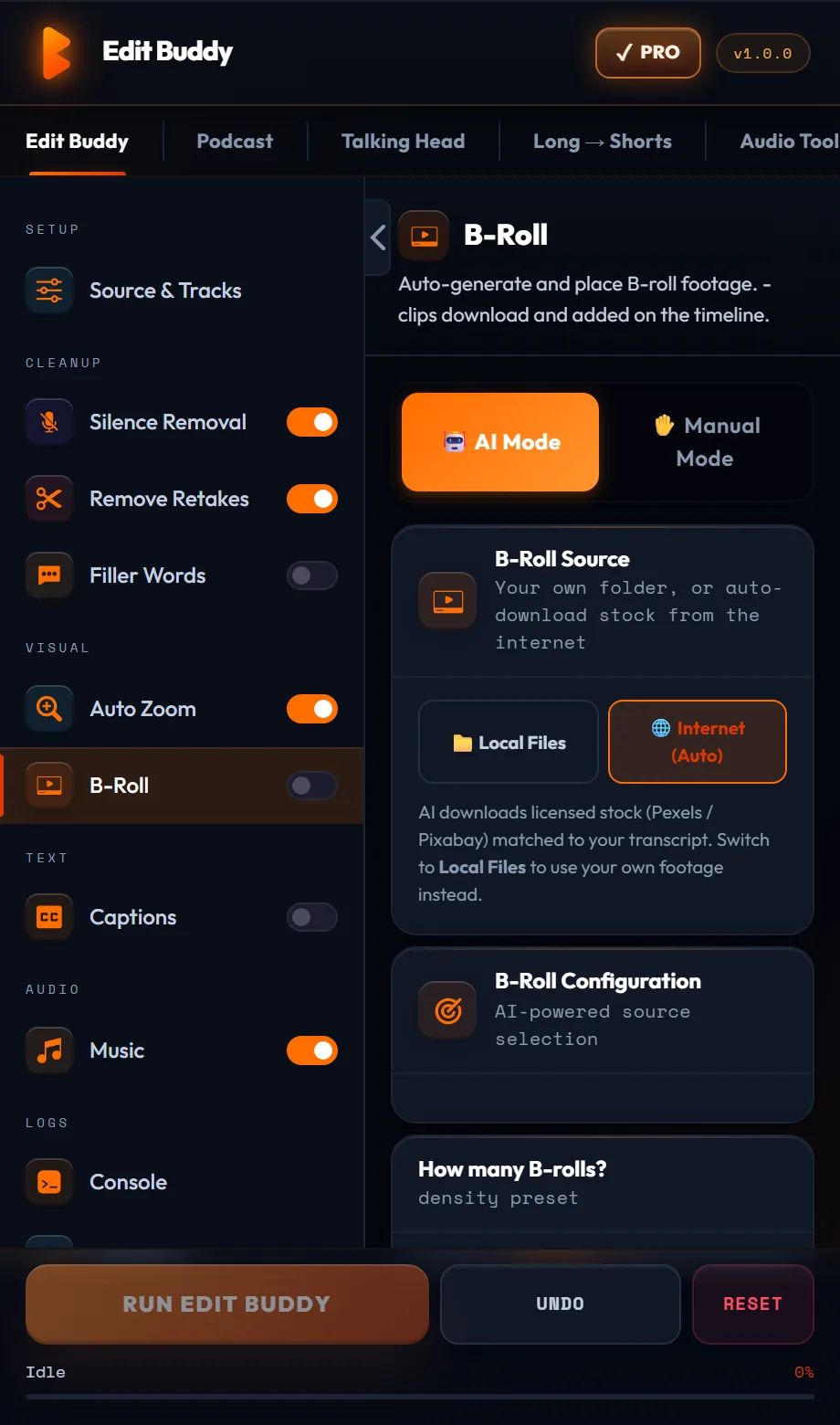
Key features of EditBuddy's auto B-roll for Premiere Pro
Most auto B-roll tools search for literal keywords from your transcript and return generic stock footage. EditBuddy uses a narrative-and-emotion pipeline that generates visual metaphors — producing B-roll that actually matches the feeling and intent of what's being said.
Metaphor-first AI prompting
The AI is instructed to generate visual metaphor queries, not literal keyword searches. A sentence about revenue growth gets "seedling pushing through concrete" not "bar chart increasing." A sentence about clarity gets "foggy mountain path clearing" not "light bulb." The result is cinematic B-roll that feels intentional.
Emotion detection per segment
EditBuddy classifies each transcript segment as positive, negative, motivational, or neutral before generating a search query. Positive segments get uplifting, warm-toned visuals. Motivational segments get dynamic, high-energy clips. Neutral segments get clean, informational footage. The emotional arc of your video is preserved visually.
Hook protection — no B-roll in the first 3 seconds
The first three seconds of a video are critical for retention on YouTube, TikTok, and Instagram Reels. EditBuddy never places B-roll over your opening hook, ensuring the viewer sees your face and your opening statement — not a generic stock clip. The buffer duration is configurable.
Visual diversity enforcement
EditBuddy tracks the visual category of each placed clip. If the same category (people, technology, nature, abstract) appears three times in a row, it automatically switches categories for the next clip. Your video doesn't turn into a parade of the same visual style.
Smart source routing
Source selection is automatic: Pexels is used for people, lifestyle, and documentary-style footage; Pixabay is used for technology, abstract graphics, and motion backgrounds. This matches the library strengths to the visual need rather than searching both sources for everything.
Clips placed on V3 — aligned to edited timeline
All B-roll clips are imported into your Premiere Pro project bin and placed on V3 using the time-remap table from earlier pipeline steps. B-roll in-points align to the trimmed sequence, not the raw source media. No manual re-positioning required after placement.
Free commercial-use footage from Pexels and Pixabay
All footage fetched by EditBuddy is free for commercial use under the Pexels and Pixabay licenses. No per-clip cost, no royalty exposure, no stock site subscription required. The clips download to a local cache and are reused across projects when the same search query appears.
Fully editable after placement
B-roll clips on V3 are standard Premiere Pro clips. Delete any clip you dislike, drag in a replacement from your own bin, extend or trim clip duration, or re-run the B-roll step with different settings. EditBuddy never locks your timeline.
How automatic B-roll placement works in Premiere Pro
Four steps from speech transcript to a visually rich timeline. B-roll placement for a 10-minute video typically takes 3–6 minutes depending on clip download speed.
Silence and retake removal run first
EditBuddy's pipeline always cleans the timeline before placing B-roll. This means B-roll covers clean speech segments — not gaps, false starts, or filler words. Placement aligns to the trimmed sequence, not raw footage.
AI identifies visual moments and generates queries
The speech transcript is analysed for moments where visual cutaway would improve engagement: abstract concepts, statistics, emotional beats, action statements. For each moment, the AI generates a visual metaphor search query rather than a literal keyword.
Clips are fetched, scored, and downloaded
EditBuddy searches Pexels and Pixabay with the generated queries, applies visual diversity filtering, scores results by emotional match and visual quality, downloads the best match for each segment to a local cache, and imports them into your Premiere Pro project bin.
Clips placed on V3 — review and refine
Each clip is placed on V3 at the correct in-point, trimmed to the segment duration. Review the placements, swap any clips you don't like, then continue to zoom keyframes or captions — or export directly from this step.
Auto B-roll in Premiere Pro — try it free
EditBuddy fetches relevant footage from Pexels and Pixabay based on your transcript and places it automatically. First 60 minutes of AI editing free.
View Plans & Start Free →Who uses EditBuddy's auto B-roll in Premiere Pro?
From solo YouTube creators to agency post teams, automatic B-roll placement saves the most time-consuming visual research step in the whole editing process.
YouTube educators and explainers
Explainer and educational content lives or dies on whether the visuals match the concepts being discussed. Manually finding stock footage for every abstract idea takes longer than the actual editing. EditBuddy's metaphor-first prompting finds conceptually appropriate B-roll in seconds per segment.
News and documentary video editors
Context-setting B-roll is essential in news and documentary content. EditBuddy's emotion detection and metaphor prompting produce documentary-appropriate visuals rather than generic stock smiles. Source routing to Pexels' documentary-style library improves result quality for this content type significantly.
Marketing and brand video teams
Client talking-head videos need B-roll to stay engaging beyond the 30-second mark. EditBuddy handles the time-consuming B-roll research and placement pass so your team can focus on the strategic edits — pacing, narrative structure, and brand-specific visuals that the AI can't source from a stock library.
Why EditBuddy vs. manual B-roll research in Premiere Pro
The alternative to auto B-roll is the workflow every editor knows: pause the edit, open Pexels or Artgrid in a browser, search three or four queries, find a clip, download it, import it into Premiere, drag it to V3, trim it. Repeat 15–30 times per video.
Manual B-roll research workflow
Average time per clip: 4–8 minutes of browsing, downloading, importing, and placing. For a 10-minute video needing 20 B-roll placements, that's 80–160 minutes of work — the single largest time cost in many post-production workflows.
Result quality is often inconsistent: the clips you find first are the ones you use, not the ones that best match the emotional tone or conceptual content of the speech.
EditBuddy auto B-roll
AI analyses all segments simultaneously and generates queries in parallel. Clips download in the background while you review other edits. 20 placements are done in 3–5 minutes of wall-clock time, not 80–160 minutes of active browser searching.
Result quality is consistently matched to the emotional and conceptual content of each segment — not whatever happened to be on the first page of search results.
Stop hunting stock sites during every edit
EditBuddy's AI B-roll engine picks, downloads, and places footage on V3 of your Premiere timeline automatically. Start free — no credit card required.
Start Free Trial — No Credit CardFrequently asked questions about auto B-roll in Premiere Pro
How does EditBuddy's AI decide where to place B-roll in Premiere Pro?
EditBuddy analyses the Whisper speech transcript from the retake detection step. It identifies moments where a visual cutaway would improve engagement — abstract concepts that can't be shown on a talking head, statistics, action verbs, emotional high points, and statements that benefit from visual reinforcement. Each identified moment gets an AI-generated visual metaphor query rather than a literal keyword search.
What is metaphor-first B-roll prompting and why does it matter?
Most automated B-roll tools search for the literal nouns in your transcript: a sentence about "increasing revenue" would search for "money" or "cash." EditBuddy's AI is specifically instructed to generate visual metaphor queries instead — so "increasing revenue" might become "river widening into open water" or "staircase ascending toward bright sky." This produces B-roll that feels intentional and cinematic rather than generically stock. It also searches more effectively in libraries like Pexels that are indexed by mood and visual story, not just object keywords.
Where does the B-roll footage come from — is it free to use commercially?
EditBuddy sources footage from Pexels and Pixabay. All clips from both libraries are licensed for free commercial use under the Pexels and Pixabay licenses respectively — no royalties, no attribution required for most use cases. Footage is downloaded to a local cache on your machine and reused across projects when the same query produces the same result, reducing download time on repeat projects.
Will B-roll placement break my existing captions or zoom keyframes?
No. B-roll is placed exclusively on V3. Captions are on V4, zoom keyframes are on V2, and main footage is on V1. EditBuddy never touches tracks it doesn't own. If you run B-roll placement after captions are already on V4, the captions are completely unaffected — the pipeline is track-isolated by design.
Can I use my own footage instead of stock B-roll?
Yes. The AI placement step identifies where B-roll should go and what duration it should be. You can replace any auto-placed clip by dragging your own footage from the Premiere project bin onto V3 at the same position. The time-remap table alignment means your in-point is already correct — just swap the clip content.
Want B-roll placed without the research?
Every EditBuddy editing order includes AI-matched B-roll placed over jump cuts automatically. No stock site subscriptions, no manual searching — from $15.
Get B-Roll Done For You →Keep going — the full EditBuddy pipeline
Auto B-roll pairs with silence removal, retake detection, captions, and zoom to create a complete post-production pipeline inside Premiere Pro.