EditBuddy edits multicam podcasts in Adobe Premiere Pro with up to 8 speakers automatically. It analyzes each mic track to detect who's speaking, then cuts to the matching camera angle in real-time — turning a 2-hour podcast edit into a 5-minute job. Supports wide shots, B-roll cutaways, and intro trim.
Podcast editor for Adobe Premiere Pro — automatic multi-camera speaker switching
EditBuddy analyses each speaker's microphone audio and builds a fully edited, speaker-switched podcast video directly inside Premiere Pro. No multicam sequence setup, no manual cut-per-speaker, no round-trip to another app.
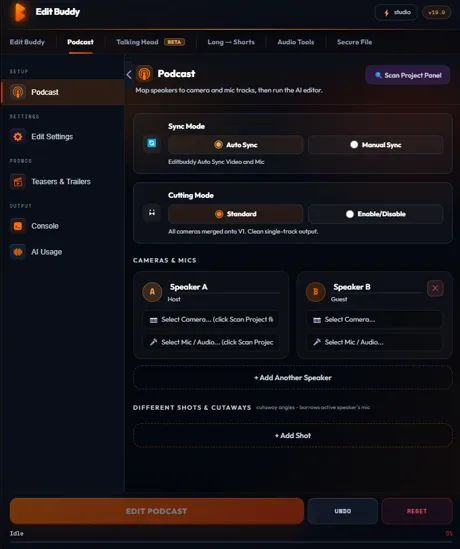
Key features of EditBuddy's Premiere Pro podcast editor
Editing a multi-camera podcast in Premiere Pro traditionally means manually cutting between speakers — watching the full recording and marking every speaker transition. EditBuddy automates the entire cut structure from the audio alone, in minutes, not hours.
Track-based speaker mapping — no multicam needed
Map each speaker's camera to a video track (V1–V8) and their microphone to the corresponding audio track (A1–A8). EditBuddy reads active speech on each audio track and builds the cut structure from that data — no multicam source sequence or manual sync required.
Timeline-derived sync offsets
Per-speaker sync is calculated from the mic clip's source in-point and timeline start position — not from a manual sync marker or slate. For standard podcast recording setups where all mics start recording at roughly the same time, sync is automatic and accurate to within a single frame.
Minimum hold duration prevents rapid-fire cuts
Set the minimum time EditBuddy must stay on a speaker before cutting. This prevents jarring rapid cuts when two speakers are talking closely together and gives your edit a natural, documentary-style pacing rather than a hyperactive talk-show feel.
Wide shot integration with configurable frequency
Assign an optional wide shot track. Set a frequency — for example, every 4th cut goes to the wide shot regardless of who's speaking. This produces the visual rhythm of a professionally shot podcast without manually inserting wide shots throughout a 60-minute recording.
Automatic intro trim
The podcast engine detects dead air and setup chatter at the start of a recording and returns an optional intro trim value. EditBuddy applies the trim automatically to the beginning of the sequence — removing the minute of mic checks and "are we recording?" before the real conversation starts.
Camera audio muted — mic audio active
After speaker switching, EditBuddy automatically mutes the linked camera audio on each clip (which would contain inferior camera mic audio) and unmutes the dedicated microphone tracks. The exported video uses clean mic audio on every speaker — without manual audio routing adjustment.
Up to 8 speakers supported
EditBuddy supports up to 8 speakers across V1–V8 and A1–A8 tracks. Two-person podcasts, panel discussions with a host and two guests, and roundtable formats with up to eight participants are all handled with the same setup workflow.
Compatible with captions and B-roll pipeline
After podcast editing produces the speaker-switched sequence, run EditBuddy's auto-captions pipeline on the result. Whisper transcribes the final speaker-switched audio and places captions on V4 — giving your podcast video full caption coverage without re-running any upstream steps.
How to auto-edit a podcast in Premiere Pro
Four steps from a multi-track Premiere Pro sequence to a fully edited, speaker-switched podcast video. A two-person 60-minute podcast typically takes under five minutes to process.
Map speakers to video and audio tracks
Open the EditBuddy Podcast Setup panel. Assign each speaker's camera track (V1–V8) and mic track (A1–A8). Optionally assign a wide shot track. EditBuddy validates that each assigned track has a clip before proceeding.
Configure cut timing preferences
Set minimum hold duration (e.g. 2 seconds), wide-shot frequency (e.g. every 5th cut), and whether to apply an intro trim. These settings are saved per project so you don't reconfigure for every episode.
Click Podcast Edit and wait
EditBuddy reads the audio on every mic track, derives sync offsets from timeline in-points, runs the podcast engine, calculates the full cut structure, and overwrites the sequence with speaker-switched segments via ExtendScript. Progress shows live in the panel.
Review the speaker-switched sequence
The Premiere timeline now shows cuts between speaker camera tracks. Review pacing, adjust any individual cut by hand, then add captions or export directly. The whole edit from raw multi-track to reviewed cut typically takes under 10 minutes for a 60-minute podcast.
Edit podcasts in Premiere Pro with AI — free trial
EditBuddy's multicam podcast mode detects active speakers, switches cameras, removes silence and fillers, and creates clips — from one panel in Premiere Pro.
View Plans & Start Free →Who uses EditBuddy to edit podcasts in Premiere Pro?
Whether you edit your own podcast or handle five client shows per week, EditBuddy's podcast editor removes the single most repetitive task in the whole workflow.
Podcast creators who edit their own shows
You record a 60-minute conversation and then spend 3–4 hours manually cutting between cameras. EditBuddy compresses that 3–4 hours into the time it takes to grab a coffee. The result is a properly paced, speaker-switched cut that you review and polish — not build from scratch.
Video editors handling multiple podcast clients
Agency podcast editors often handle 5–15 episodes per week across multiple clients. The speaker-switching pass is the most mechanical and time-consuming. EditBuddy automates it so you can handle more shows without adding headcount, and spend your Premiere Pro time on the parts that require creative judgment.
Podcasters upgrading from audio-only to video
Many established audio podcasters are adding video for YouTube and Spotify Video. The barrier is the editing time: audio editing is fast, multi-camera video editing is not. EditBuddy's podcast editor makes multi-camera video editing as fast as the audio-only workflow — removing the time cost of going video.
Why EditBuddy vs. Premiere Pro's multi-camera sequence workflow
Premiere Pro's multicam sequence is the standard approach for multi-camera editing — but it adds setup overhead that most podcast editors find frustrating and error-prone.
Premiere Pro multicam sequence
Create a multicam source sequence. Sync clips. Create a nested multicam sequence. Switch to Multi-Camera view. Play through the full recording clicking to switch angles in real time. Review and fix mistimed switches. Flatten the sequence to commit cuts.
For a 60-minute podcast, this takes 60–90 minutes of active real-time playback plus correction — plus setup time. For editors handling multiple weekly episodes, this is a significant time cost per episode.
EditBuddy podcast editor
Assign tracks, set timing preferences, click Podcast Edit. EditBuddy analyses all speakers simultaneously, calculates the full cut structure in under a minute, and commits cuts directly to the Premiere timeline — no real-time playback required.
For a 60-minute podcast, the automated cut structure is built in under 3 minutes. Review time is 10–15 minutes. Total active editing time: under 20 minutes per episode.
Edit your next podcast in under 20 minutes
EditBuddy's track-based podcast editor builds the speaker-switched cut structure automatically inside Premiere Pro. Start free — no credit card required.
Start Free Trial — No Credit CardFrequently asked questions about podcast editing in Premiere Pro
How does EditBuddy do automatic speaker switching in Premiere Pro?
EditBuddy reads the audio waveform on each speaker's dedicated microphone track (A1–A8). It identifies active speech segments per speaker using energy-based analysis, derives per-speaker sync offsets from the clip's timeline in-point relative to its source in-point, then runs the podcast engine — a Python-based cut structure algorithm — to calculate optimal speaker switches. Cuts are committed to the Premiere Pro timeline via ExtendScript, overwriting segments on the video tracks to reflect the speaker-switched sequence.
Does EditBuddy require a multicam sequence in Premiere Pro to edit a podcast?
No. EditBuddy uses a track-based approach rather than a multicam source sequence. Each speaker's footage is on a separate video track (V1–V8) with their corresponding mic on the matching audio track. EditBuddy reads active speech per audio track and overwrites video track segments to build the cut structure. This is simpler to set up than a multicam sequence and does not require any manual sync alignment.
How many speakers can EditBuddy handle in a Premiere Pro podcast edit?
EditBuddy supports up to 8 speakers across tracks V1–V8 (video) and A1–A8 (audio), plus an optional wide-shot track. Two-person podcasts, three-person panels (host plus two guests), and roundtable formats with up to eight participants are all supported with the same configuration interface.
Can EditBuddy add captions to the podcast video after editing?
Yes. After the speaker-switched sequence is built, you can run EditBuddy's auto-captions pipeline on the result. Whisper transcribes the final edited audio — which now contains the correct speaker-switched audio segments — and places caption blocks on V4, aligned to the edited timeline. The captions correctly reflect which speaker is talking at each moment.
What happens to the camera audio after podcast editing?
EditBuddy automatically mutes the linked camera audio on each clip after speaker switching. Camera microphones capture inferior audio compared to dedicated podcast microphones. The dedicated mic tracks (A1–A8) remain active and carry the clean audio to the export. No manual audio routing or mute toggle is required — EditBuddy handles the audio isolation as part of the edit step.
Rather have your podcast edited for you?
EditBuddy's podcast editing service delivers a full edit + 2 Shorts + 2 highlights for $100 per episode. AI-enhanced, human-reviewed, 48-hour delivery.
Order Podcast Editing →Keep going — combine podcast editing with the full pipeline
Podcast editing gives you the cut structure. Captions, B-roll, and shorts repurposing turn that structure into a fully produced video.