EditBuddy is an AI retakes remover for Adobe Premiere Pro. It detects and removes repeated takes, false starts, duplicate phrases, and filler words from your timeline automatically. It transcribes your footage, identifies retakes by comparing similar phrasing, and keeps only the best version — typically saving 30-40% of your edit time on talking-head video. Updated July 2026.
Remove retakes & filler words in Premiere Pro — AI that understands speech
EditBuddy's AI retake remover reads your transcript, identifies repeated takes, false starts, duplicate phrases, ums, and tangents, and cuts them directly on your Premiere Pro timeline. Not a keyword list — real speech understanding.
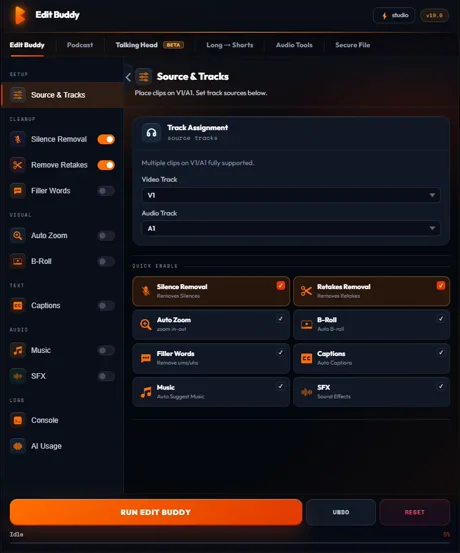
Key features of EditBuddy's AI retake detection
Removing retakes in Premiere Pro used to mean scrubbing through your transcript in Descript, exporting XML, and re-importing — losing your color grade, effects stack, and audio routing. EditBuddy does it inside Premiere with no round-trip.
Two-phase hybrid AI detection
A fast local detection layer finds meta-speech ("actually let me redo that"), prefix chains, and similarity clusters in milliseconds. An AI semantic layer then reconstructs the intended clean script. Both results merge with confidence-weighted agreement logic.
Filler word removal with context awareness
EditBuddy removes um, uh, er, like, you know, and similar fillers using the full speech transcript rather than a keyword match. "I like this idea" is never flagged. Only genuine hesitation fillers surrounded by speech patterns that indicate speaker uncertainty are cut.
Take group system with three keep strategies
Related takes are grouped using a proprietary multi-signal similarity engine. Per group, choose Keep Last (default), Keep Longest, or Keep Best (AI quality score + recency bonus).
Noise detection for sub-second artifacts
Mouth clicks, breath pops, and lip smacks that are short and low-confidence are caught by the noise pass — not as retakes, but as audio artifacts that get cleaned up before the transcript is analyzed.
Multi-signal similarity prevents false positives
Three dedicated guards prevent over-cutting: the list-prefix guard (four or more sentences with the same two-word opener are a list, not retakes), the catalog-sibling guard, and the divergent-prefix guard. Combined, they keep legitimate repeated structures intact.
Backup sequence — revert in one click
Before any destructive edit, EditBuddy clones your sequence with "— Backup" in the Project panel. Every retake cut is reversible. There is no undo limit, no re-ingest required — just switch back to the backup sequence.
Runs inside Premiere Pro — no export
All cuts are committed via ExtendScript directly to your active Premiere timeline. No XML export, no Descript round-trip, no re-import. Your color grade, audio routing, and effects are untouched.
If AI fails, system detection runs anyway
The local detection layer always runs first. If the AI call fails or times out, EditBuddy falls back to the local results immediately — there is no wasted work and no error state that blocks your edit.
How to remove retakes in Premiere Pro with EditBuddy
From raw interview footage to a clean, retake-free timeline in four steps. The AI analysis of a 30-minute interview typically takes 45–90 seconds.
Install EditBuddy and open your sequence
Install EditBuddy as a Premiere Pro CEP extension (Window → Extensions → EditBuddy). Activate your timeline. The panel reads the active sequence automatically — no file paths to configure.
Silence removal runs automatically first
EditBuddy's pipeline always starts with silence removal. Dead air is cut before the AI transcribes the audio — this speeds up Whisper transcription and reduces the volume of speech the retake model needs to analyze.
AI transcribes and detects retakes
High-accuracy speech recognition transcribes your audio with word-level timestamps. Local retake detection runs in under a second. The AI semantic layer then reconstructs the intended script and identifies which takes to cut. Progress is shown live in the panel.
Choose your keep strategy and apply
Select Keep Last, Keep Longest, or Keep Best in the dropdown. EditBuddy shows you the take groups it found and which segments will be cut. Confirm, and cuts land directly on your Premiere timeline.
Remove every retake automatically — free trial
EditBuddy's AI retake detection finds every repeated sentence using Claude and GPT-4o transcript analysis. First 60 minutes free, no credit card required.
View Plans & Start Free →Who benefits from AI retake removal in Premiere Pro?
Any editor working with unscripted or lightly scripted speech — from solo YouTubers to post-production teams — saves significant time with AI retake detection.
Solo creators doing their own editing
You're the talent and the editor. Scrubbing through your own footage hunting for the "um"s and the third time you started the same sentence is demoralizing. EditBuddy reduces that from 45 minutes of manual work to a 90-second AI pass — so you can spend your editing time on creative decisions, not cleanup.
Agency editors handling client interviews
Client talking-head interviews are full of restarted takes and false starts. Billable hours spent cleaning these up are the first thing clients question. EditBuddy cuts the cleanup phase by 60–80% so your agency can handle more projects at the same headcount.
Podcast video producers
Two-speaker conversations generate twice the filler words and cross-talk hesitations. EditBuddy handles multi-speaker transcripts, identifying fillers per speaker without treating one speaker's natural pause as the other's retake.
Why EditBuddy vs. Descript or manual retake removal
The two most common alternatives are Descript (transcript-based editing in a separate app) and manual scrubbing in Premiere. Both have serious workflow costs.
Descript / export-and-re-import workflow
Export your sequence as XML. Import into Descript. Edit the transcript. Export back as XML. Re-import into Premiere and reconcile any color grade, audio effects, or multi-track work that Descript doesn't preserve.
Total round-trip time: 15–40 minutes per project, not counting reconciliation errors. And Descript's transcript editing is separate from your Premiere workspace, so you're context-switching constantly.
EditBuddy inside Premiere Pro
No export. No import. No round-trip. EditBuddy lives in a panel inside Premiere. AI analysis runs in the background while you review other material. Cuts land on your existing timeline — your color grade, effects, and audio routing are untouched.
Total time: 45–90 seconds for AI analysis, then one click to apply. The entire retake removal step fits inside the time it used to take to export an XML file.
How EditBuddy compares to other retake remover plugins
Several Premiere Pro plugins can remove retakes: EditBuddy, Cutback, Phantom Editor, and FireCut all detect repeated takes from a transcript. The difference is scope and workflow.
| Plugin | How it removes retakes | What else it does in the same panel |
|---|---|---|
| EditBuddy | Hybrid detection — a fast local structural pass (meta-speech, prefix chains, similarity clusters) merged with Claude AI clean-script reconstruction. Take groups with Keep Last / Longest / Best. | Silence removal, filler words, auto captions, AI B-roll, auto zoom, multicam podcast editing, long-form to Shorts — one pipeline, no API key to manage. |
| Cutback | "Remove Retakes" assistant inside its Auto Rough Cut — detects repeated phrases and false starts from the transcript. | Rough-cut assistant focused on cutting; other steps are separate. |
| Phantom Editor | "AI Repeat Removal" — Gemini-based analysis that cuts repeated takes and false starts into an assembly cut. | Rough cut, silence and filler removal. |
| FireCut | Repeated-take detection — keeps the chosen line, deletes the rest. | Silence cutting, captions, chapters, and other tools. |
Full roundup: Best Retake Remover Plugins for Premiere Pro (2026). Deeper comparisons: EditBuddy vs Phantom Editor, vs AutoCut, vs FireCut, and vs Cutback. For the detection internals, read how AI retake detection works.
Cut every "um" and false start — automatically
EditBuddy's AI retake detection works inside Premiere Pro. No round-trips, no lost color grades, no API keys to manage. Start free — no credit card required.
Start Free Trial — No Credit CardFrequently asked questions about removing retakes in Premiere Pro
How does EditBuddy detect retakes and filler words in Premiere Pro?
EditBuddy uses a hybrid detection system. A fast local detection layer runs in under a second, identifying meta-speech markers like "actually let me start over," repeated sentence-starter chains, and similarity clusters using proprietary similarity analysis. An AI semantic layer then reconstructs the intended clean script from context and identifies the gaps (retakes, fillers, tangents). Both results merge with confidence-weighted agreement logic.
What filler words does EditBuddy remove from Premiere Pro?
EditBuddy removes um, uh, er, like (as a filler), you know, I mean, sort of, kind of, right (as a filler), and other spoken hesitations. Because detection is transcript-based rather than keyword-based, "I like this idea" or "you know what, let's do it" are never incorrectly flagged — the surrounding context determines whether a word is a filler or intentional speech.
How does EditBuddy decide which take to keep when there are multiple retakes?
EditBuddy groups related takes using a proprietary multi-signal similarity engine that analyzes text overlap, semantic meaning, and audio characteristics together. Within each group, you choose the keep strategy: Keep Last (final recorded take), Keep Longest (most complete delivery), or Keep Best (multi-signal quality score plus a recency bonus that breaks ties in favor of the later take).
Can EditBuddy accidentally cut good takes or real speech?
Several guards prevent over-cutting. The list-prefix guard: if four or more sentences start with the same two-word prefix (e.g. "First, the..." "Second, the..."), EditBuddy treats them as list items, not retakes. The catalog-sibling guard prevents similar product names or enumerated items from being grouped. The divergent-prefix guard keeps sentences that start similarly but immediately diverge. And the backup sequence lets you revert entirely if a cut doesn't feel right.
Does AI retake detection upload my footage or require an API key?
Your footage is never uploaded. EditBuddy runs Whisper locally to transcribe the audio — only the text transcript is sent to EditBuddy's server for AI analysis. You never manage an OpenAI or Claude API key. Keys live on EditBuddy's authenticated server, and the same models (Claude Sonnet) are called with the same prompts — accuracy is identical to calling the API directly.
What is the best retakes remover plugin for Premiere Pro?
EditBuddy, Cutback, Phantom Editor, and FireCut can all remove retakes in Premiere Pro by analyzing the transcript for repeated phrases and false starts. EditBuddy is the strongest choice when you want retake removal as part of a full pipeline — it removes silence, retakes, and filler words, then adds captions, B-roll, and zooms in the same panel, with no API key to manage and a backup sequence created before every cut. If you only need a rough-cut assistant, the other tools cover that single step.
Can AI remove repeated takes and false starts automatically?
Yes. AI retake removal transcribes your footage with word-level timestamps, compares utterances for structural and semantic similarity, groups repeated takes together, and keeps only one version of each. EditBuddy detects full restarts ("let me try that again"), partial false starts ("the main— actually, the main point is..."), and paraphrase restarts where the wording changes but the meaning repeats — then applies frame-accurate cuts directly on your Premiere Pro timeline.
Want retakes removed without installing anything?
Our done-for-you editing service uses AI retake detection on your footage — delivered back clean in 48 hours. Full podcast edits from $100.
View Editing Service →Keep going — more EditBuddy features
Retake removal is step two in EditBuddy's pipeline. Add captions, B-roll, zoom, or repurpose the cleaned footage for Shorts — all without leaving Premiere Pro.