EditBuddy converts long-form videos into YouTube Shorts, Instagram Reels, and TikTok clips automatically inside Adobe Premiere Pro. It uses AI to find the most viral moments, reframes to 9:16, adds animated captions, and exports up to 5 Shorts per long-form video by default — all in under 10 minutes.
Long video to Shorts in Adobe Premiere Pro — AI finds the viral moments
EditBuddy analyses your long-form video, identifies the highest-virality moments, and builds ready-to-export 9:16 Short sequences inside Premiere Pro — with captions and hook overlays included. Turn one long video into five Shorts in under 10 minutes.
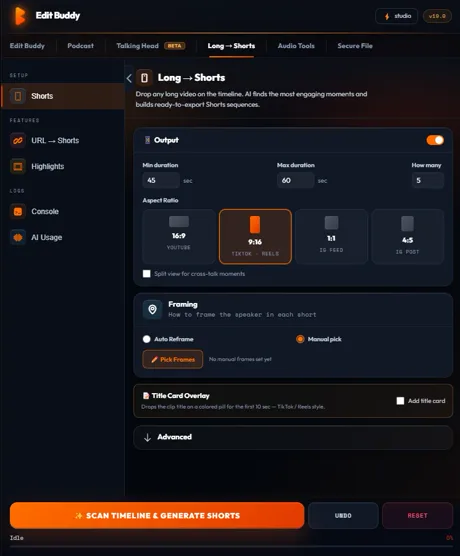
Key features of EditBuddy's long-to-shorts for Premiere Pro
Repurposing long-form content for Shorts is one of the highest-ROI content strategies available — but manually watching 60 minutes of footage to find 60-second clips is not a sustainable workflow. EditBuddy makes it systematic and fast.
AI virality scoring from the transcript
EditBuddy transcribes the full video with Whisper and scores each segment for viral potential: strong hook sentences, surprising facts, opinion statements, how-to explanations, emotional peaks, and segments that are structurally complete (start and end at natural sentence boundaries). Segments scoring above threshold become Short candidates.
9:16 sequences created directly in Premiere Pro
For each selected viral moment, EditBuddy creates a new 9:16 vertical sequence in your Premiere Pro project bin, places the clip with centre-crop auto-reframe for 16:9 source footage, and names it with the hook text so you can identify each Short at a glance in the Project panel.
Hook overlay generation for the first frame
The first 1–2 seconds of a Short are critical for the scroll-stop. EditBuddy generates AI hook text for each Short — a provocative question, surprising claim, or teaser statement drawn from the clip's content — and renders it as a PNG overlay placed on V5 at the start of the sequence.
Captions included on every Short
Each Short sequence includes auto-generated captions on V4, styled for vertical video (large font, centred). Captions are synced to the segment's audio — not offset to the long-form timeline position — so they are accurate and correctly timed for the Short's duration.
B-roll carried through from long-form pipeline
If you've already run auto B-roll on the long-form sequence, the B-roll placements are preserved in the Short sequences where the segment duration allows. You get the visual richness of the long-form edit carried into each Short without re-running B-roll analysis.
Up to 5 Shorts per long-form video (configurable)
EditBuddy selects the top 5 highest-scoring viral moments by default. The limit is configurable — extract 3 for a quick run or 10 for a full content calendar repurpose. For a 60-minute interview, there are typically 8–15 strong candidates to choose from.
Works from YouTube download or local file
The Shorts pipeline works on any video already in your Premiere Pro timeline — whether you recorded it yourself, downloaded a YouTube video with the built-in downloader, or imported an existing client recording. The source doesn't matter; the pipeline reads the active Premiere sequence.
Each Short is a fully editable Premiere Pro sequence
Shorts are standard Premiere Pro sequences — not locked files, not exported clips you re-import. Edit timing, swap hook text, adjust captions, add your logo or end card, change the colour grade, or trim the in and out points. Full control, no round-trip.
How to convert a long video to Shorts in Premiere Pro
Four steps from a long-form Premiere Pro sequence to five ready-to-export 9:16 Shorts. For a 60-minute video, the whole process takes 8–12 minutes of wall-clock time.
Open your long-form video in Premiere Pro
Import your video and activate the sequence in the EditBuddy panel. The Shorts pipeline reads the active Premiere sequence — you don't need to set up a separate project or export anything first. Works with sequences that have already been through silence and retake removal, or with raw footage.
Configure number of Shorts and minimum length
Open the Shorts tab in EditBuddy. Set the maximum number of Shorts to generate (default: 5), the minimum and maximum Short duration (default: 30–90 seconds), and whether to include hook overlay generation and auto-captions per Short.
Run Shorts generation — AI scores and extracts clips
Click Generate Shorts. Whisper transcribes the video (or reuses an existing transcript if one was generated in an earlier pipeline step). AI scores segments, selects the top candidates, creates 9:16 sequences in your project bin, and generates hook overlay images. Live progress shows per Short.
Review each Short and export
Each Short appears as a separate sequence in your Premiere Pro project bin. Review timing and captions, swap the hook text if needed, add your branding or end card. Export each Short as a separate file for YouTube Shorts, TikTok, and Instagram Reels.
Create Shorts inside Premiere Pro — free trial
EditBuddy's highlights engine scores every segment for hook quality and creates finished 9:16 Shorts with captions and music automatically. First 60 minutes free.
View Plans & Start Free →Who uses EditBuddy's long-to-shorts pipeline in Premiere Pro?
Any creator or editor who produces long-form content and wants to repurpose it for short-form platforms without doubling their editing time.
YouTube creators repurposing for Shorts and TikTok
You already spend 3–6 hours editing a 15-minute YouTube video. Manually watching it again to find Short clips adds another 1–2 hours — and you still need to build the 9:16 sequences. EditBuddy does both automatically: it finds the clips and builds the sequences. Your long-form edit now generates five Shorts for free.
Podcast editors extracting clips for social
A 60-minute podcast episode contains dozens of quotable, shareable moments. Finding them manually means re-watching the entire recording. EditBuddy's AI scores every segment of the transcript in seconds, surfaces the best moments, and builds them as Short sequences — turning your podcast editing workflow into a social content production pipeline.
Content agencies managing multiple clients
Agencies producing long-form video for clients face constant pressure to also deliver short-form repurposing without charging separately for each Short. EditBuddy makes short-form repurposing an automatic byproduct of the long-form edit — not a separate billable service that requires re-watching every video.
Why EditBuddy vs. manual Short creation in Premiere Pro
The two common alternatives — watching your video and manually clipping moments, or exporting to a dedicated repurposing tool like Opus Clip — both have significant workflow costs.
Manual clipping or Opus Clip / external tool
Manual clipping: re-watch 60 minutes of footage, mark in and out points, create new sequences, add captions, generate hook text, build hook overlays. 2–4 hours per video. External repurposing tools: upload your video to a web app, wait for processing, download the clips, re-import into Premiere, add your branding.
Both approaches disconnect the Short creation from the Premiere Pro edit — meaning any change to the long-form edit (a timing trim, a caption correction) doesn't flow through to the Shorts automatically.
EditBuddy long-to-shorts in Premiere Pro
AI analyses the transcript, scores segments, creates 9:16 sequences, adds captions, generates hook overlays — all inside Premiere Pro, in under 10 minutes. No upload, no external tool, no re-import. The Shorts are Premiere sequences, so any edit to the source sequence flows through.
And because the Shorts are built from the same edited timeline as the long-form video, they inherit all the cleanup, captions, and B-roll from the upstream pipeline — not from the raw footage.
Turn one long video into five Shorts in under 10 minutes
EditBuddy finds the viral moments, builds the 9:16 sequences, adds captions and hook overlays — all inside Premiere Pro. Start free — no credit card required.
Start Free Trial — No Credit CardFrequently asked questions about long-form to Shorts in Premiere Pro
How does EditBuddy identify viral moments in a long-form video?
EditBuddy transcribes the full video with a high-accuracy local speech recognition engine and runs AI scoring on every segment of the transcript. Each segment is scored on multiple virality signals: hook strength (does the first sentence make you want to keep watching?), surprise factor (does it contain a counterintuitive claim or statistic?), opinion clarity (does it take a clear position?), structural completeness (does it start and end at a natural point?), and emotional intensity. Segments above the virality threshold are ranked and the top candidates are selected for Short generation.
Does EditBuddy create 9:16 vertical sequences inside Premiere Pro?
Yes. For each selected viral moment, EditBuddy creates a new 9:16 sequence in your Premiere Pro project bin with the correct sequence settings (1080x1920, 9:16 aspect ratio). The source clip is placed with a centre-crop to convert 16:9 footage to vertical. Captions are placed on V4 with font sizes and positions tuned for vertical display. Hook overlays are on V5. All standard Premiere Pro sequence — fully editable.
What is a hook overlay and how is it generated?
A hook overlay is a text image placed over the first 1–2 seconds of a Short — the scroll-stop moment before the audio starts. EditBuddy's AI analyses the content of each Short and generates hook text: typically a provocative question ("Why did Facebook turn down $1 billion?"), a surprising claim ("This mistake costs creators 40% of their views"), or a direct teaser ("Here's what no one tells you about..."). The text is rendered as a PNG and placed on V5 as a clip at the start of the Short sequence.
Do the Shorts include captions, and can I edit them?
Yes. Each Short sequence includes auto-generated captions on V4, generated with a high-accuracy local speech recognition engine and synced to the segment's audio. Captions are styled for vertical video — larger font, centred, with a bold style suitable for mobile viewing. Because captions are placed as MOGRT clips on V4, you can edit the text, timing, or style of any individual caption block in Premiere's Essential Graphics panel after generation.
Can I extract Shorts from a video I downloaded from YouTube?
Yes. EditBuddy includes a built-in video downloader. Enter a YouTube URL in the Downloads panel, and EditBuddy downloads the video, imports it into your Premiere Pro project, and makes it available as a sequence for the Shorts pipeline. The Shorts pipeline then works on the downloaded video exactly as it does on any locally recorded footage.
Want Shorts created without editing yourself?
EditBuddy's done-for-you Shorts service delivers finished vertical clips from your long-form content — AI hook selection, captions, B-roll, music. From $15 per Short.
Order Shorts Editing →Keep going — repurpose with the full pipeline
Long-to-Shorts works best when combined with the full EditBuddy pipeline — clean the long-form footage first, then extract and publish Shorts from a polished, captioned edit.