EditBuddy removes silence from Adobe Premiere Pro timelines automatically in under 2 minutes. It scans your full timeline, detects every pause below your dB threshold, and cuts them with frame-accuracy. Works across multi-clip projects without leaving Premiere Pro.
Silence remover for Adobe Premiere Pro — automatic & frame-accurate
The fastest way to auto-remove silence from Premiere Pro timelines. No more selecting clips, hitting Q, holding Shift, praying you stayed in sync. EditBuddy does it in seconds — and keeps every frame aligned.
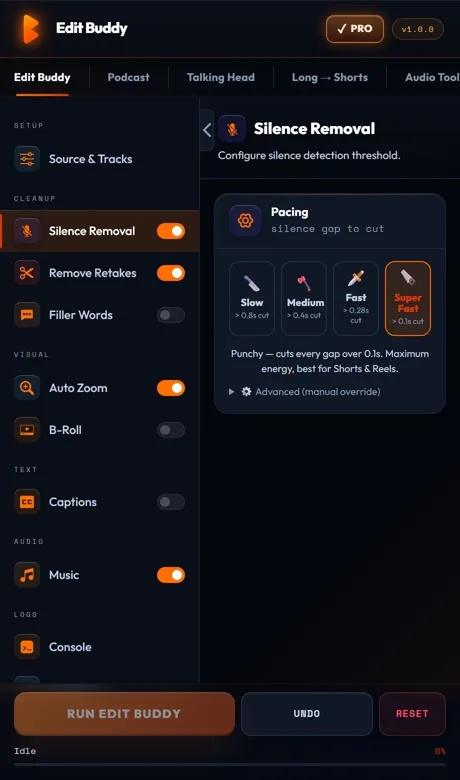
Key features of EditBuddy's silence remover
EditBuddy is built specifically for Adobe Premiere Pro editors who shoot talking-head, interview, podcast, and YouTube content. Every feature is designed around the real workflow — not a standalone app that exports to a different format.
Frame-accurate silence detection
EditBuddy analyzes the audio waveform at high resolution and converts detected gaps to exact Premiere Pro frame positions. No sub-frame rounding errors. Cuts land exactly where the audio drops below your threshold — every time.
Configurable dB threshold & minimum gap
Set your silence floor in dB and the minimum gap length in milliseconds. Defaults are tuned for talking-head footage: -35 dB floor, 500 ms minimum gap. Adjust for noisier sets (podcast in a café) or tighter edits (YouTube tutorials).
Multi-clip timeline support
Got a 45-minute interview spread across 12 clips from different SD cards? EditBuddy maps every silent region back to the correct source media frame and commits cuts in a single pass — without breaking your linked clips, multicam source, or B-roll.
Noise-aware pass (breaths, clicks, smacks)
Below-threshold noise events — mouth clicks, lip smacks, short breath pops — are detected by a separate noise pass using speech-recognition confidence scoring. They're removed alongside true silence so your cleanup is actually clean.
Automatic backup sequence
Before touching your timeline, EditBuddy duplicates your sequence with a "— Backup" label in the Project panel. Revert in one click. No undo-stack gymnastics, no re-ingesting footage.
Pipeline-safe: B-roll & captions stay aligned
After silence removal, EditBuddy stores a time-remap table so downstream steps — auto B-roll placement, caption generation, AI zoom keyframes — all align to the new, tighter timeline. No re-running the whole pipeline from scratch.
Fully local analysis — footage never leaves your machine
Silence detection runs entirely on-device via the audio engine. Your footage is never uploaded to a cloud server. Only downstream AI steps (retake analysis, B-roll prompts) route through EditBuddy's proxy — and only when you opt in.
Works inside Premiere Pro — no export needed
EditBuddy is a native CEP panel. Cuts are committed directly to your active Premiere timeline via ExtendScript. You never export XML, never re-import, never lose your color grade or audio effects.
How to auto-remove silence in Premiere Pro
Four steps from raw footage to a tight, broadcast-ready timeline. Most editors finish a 30-minute interview in under two minutes of total wall-clock time.
Install EditBuddy as a Premiere Pro panel
Download the EditBuddy installer and run it. Premiere Pro picks it up automatically. Open it via Window → Extensions → EditBuddy. The panel docks anywhere in your workspace — same as any native Premiere panel.
Open your sequence and set your threshold
Activate the timeline you want to process. EditBuddy auto-detects V1 and the linked audio track. Adjust the silence floor (dB) and minimum gap (ms) in the Setup panel — or leave defaults for talking-head footage.
Click Auto Edit — silence removal runs first
Hit Auto Edit. Silence detection is always the first stage in the pipeline. You'll see a live progress bar with the gap count as the audio engine scans your audio. A 60-minute timeline typically takes 15–30 seconds to scan.
Review cuts and continue the pipeline
Cuts appear on your timeline immediately. Scrub through, check pacing, adjust threshold if any cut felt wrong, then move on to retake removal, auto-captions, B-roll, or shorts — all from the same panel.
Try silence removal free — 60 minutes included
Install EditBuddy and run automatic silence detection on your first video free. No API key, no external setup — works inside Premiere Pro on Windows.
View Plans & Start Free →Who uses EditBuddy's silence remover?
From solo YouTube creators to agency post-production teams, EditBuddy's silence remover saves hours every week across every kind of talking-head and interview footage.
YouTube & social media creators
You shoot 30–90 minutes to get 8–15 minutes of usable content. Manually scrubbing for dead air is the part of editing you dread most. EditBuddy cuts that step to under two minutes — so you can focus on pacing, B-roll, and thumbnail rather than tedious ripple-deletes.
Podcast video editors
Long-form interview recordings are full of gaps between questions, dead air while a guest thinks, and cross-talk silences. EditBuddy handles multi-speaker, multi-clip timelines natively — no need to pre-mix or flatten audio before running silence removal.
Corporate & agency editors
Client talking-head interviews, product explainers, and training videos need to be tight but natural-sounding. EditBuddy's configurable threshold lets you tune for "professionally paced" rather than "jump-cut YouTube" — keeping natural breaths while cutting genuine dead air.
Why EditBuddy vs. Premiere Pro's built-in silence tools
Premiere Pro 2024 added basic silence detection, but it falls short in almost every real-world scenario. Here's how EditBuddy compares.
Premiere Pro built-in silence detection
Works only on single clips. Does not support multi-clip timelines, cannot map cuts back to source media frames across different files, and provides no downstream pipeline (no B-roll, no captions, no retake detection). Threshold UI is minimal and does not expose minimum gap control.
Result: useful for one-clip rough cuts, but requires manual work as soon as your timeline has more than one clip.
EditBuddy silence remover
Handles timelines with dozens of clips from different files. Frame-accurate cuts committed via ExtendScript. Configurable threshold + minimum gap + noise pass. Automatic backup sequence before edits. Feeds directly into retake removal, captions, B-roll, and auto-zoom — all from one panel.
Result: a 30-minute interview is cleaned and ready for review in under two minutes, with the full pipeline available at your next click.
EditBuddy is not affiliated with Adobe. Adobe Premiere Pro is a registered trademark of Adobe Inc.
Stop ripple-deleting silence by hand
Try EditBuddy free — no credit card required. Installs as a Premiere Pro panel in under a minute. Auto-remove silence from a 3-minute clip the moment you sign up.
Start Free Trial — No Credit CardFrequently asked questions about removing silence in Premiere Pro
How does EditBuddy auto-remove silence from a Premiere Pro timeline?
EditBuddy runs the audio engine locally on your machine to analyze the audio waveform frame by frame. It identifies every gap that falls below your configured dB threshold for longer than your configured minimum gap length, then commits ripple-deletes directly to your active Premiere Pro sequence via ExtendScript. Video and linked audio remain in sync because the cuts are made through Premiere's own timeline API — not by editing the project file externally.
Can EditBuddy remove silence from a multi-clip Premiere Pro timeline?
Yes — this is one of EditBuddy's core strengths. It walks every clip on V1, identifies each clip's source media file and in-point, detects silent regions relative to that source file's timestamp, and rebuilds the sequence with frame-accurate cuts even when the timeline contains dozens of clips from different source files. Premiere Pro's built-in silence tool does not support this.
Will the silence remover accidentally cut natural pauses or breaths?
Not with the default settings. The minimum gap length (default: 500 ms) ensures that natural speaking pauses, beat-holds, and soft breaths are preserved. Mouth clicks and lip smacks that are clearly noise (detected by Whisper confidence scoring under 0.40 with duration under 1.2 seconds) are removed by a separate noise pass so the main threshold controls only apply to genuine silence.
Does EditBuddy keep my original Premiere Pro sequence safe?
Yes. EditBuddy duplicates your sequence with a "— Backup" suffix in the Project panel before making any destructive edit. The backup is a full copy of your original timeline — all clips, effects, color grades, and audio — not just a version history entry. Switch back to it any time if you want to undo the silence removal entirely.
Which Premiere Pro versions does the silence remover support?
EditBuddy supports Premiere Pro 2022 (22.x) and all versions released since then, on both Windows 10/11 and macOS 11+. It installs as a CEP extension panel — the same mechanism Adobe uses for its own bundled panels. No hacks, no workarounds, no compatibility issues with standard Premiere Pro security settings.
Does silence removal require an internet connection or an API key?
No. Silence detection is 100% local. The audio engine runs on your machine, analyzes your audio, and the cuts are committed directly to Premiere. No footage is uploaded. An internet connection is only needed for downstream AI features you opt into — retake detection, B-roll prompts — and those AI calls are routed through EditBuddy's server (keys are managed by EditBuddy, not stored on your machine).
Don't use Premiere Pro? We do the editing for you.
EditBuddy's done-for-you service removes silence, retakes, and fillers from your videos — 48-hour delivery from $15 per Short or $100 per podcast episode.
View Editing Service →Keep going — the full EditBuddy pipeline
Silence removal is the first step. Stack the other tools to finish a video end-to-end without leaving Premiere Pro.