EditBuddy detects restarted sentences, abandoned takes, and "let me say that again" moments in your raw YouTube footage and cuts the bad ones automatically. Pick Keep Last (most common), Keep Longest, or Keep Best — then review and override any decision before exporting. Saves 45–60 minutes on a typical 30-minute raw recording.
Retake removal for YouTube — cut bad takes automatically
If you've ever said "let me say that again" on camera, you know retake editing is the slowest part of YouTube. EditBuddy detects every restart, repeated sentence, and abandoned thought, then keeps the take you want — in seconds.
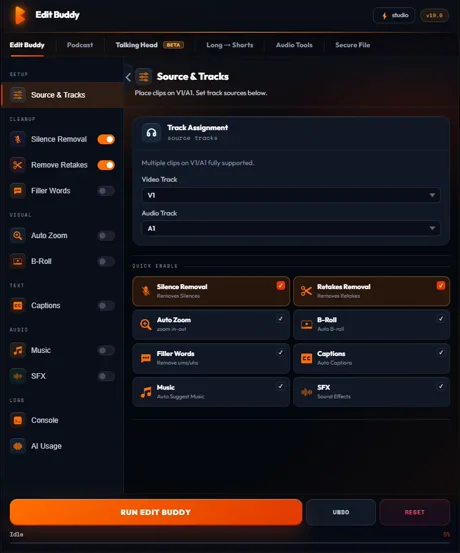
What "let me say that again" actually costs you
Three patterns of retakes that drain editing time. EditBuddy handles all three.
Explicit verbal restarts
"Let me say that again." "One more time." "Cut that." "Sorry, restart." You say these out loud and then redo the line. Manual editing means scrubbing back, finding the redo point, ripple-cutting the bad take — about 30–60 seconds per occurrence. A 30-minute recording with 8 explicit redos is 4–8 minutes of pure scrub-work.
Prefix-restart chains
You start a sentence, change your mind mid-thought, and restart with the same opening words. "So the reason — so the actual reason people fail at this is..." The first attempt has to go. EditBuddy detects matching prefixes within 3–5 second windows and cuts the abandoned starts.
Full-sentence redo clusters
Sometimes you nail a sentence, pause, then decide to re-deliver it slightly differently. Two complete versions of the same idea sit on the timeline. EditBuddy clusters them as a take group and keeps whichever your strategy picks. You save the manual side-by-side comparison.
The three keep strategies — pick how your AI behaves
Different content needs different rules. EditBuddy gives you the choice up front.
Keep Last (default for most YouTubers)
Keeps the most recent take in each cluster. Based on the assumption that if you redid a line, the final attempt is the cleanest. Works for ~85% of YouTube footage. Especially good for personality-driven channels where the energy of the final take usually wins.
Keep Longest
Keeps the longest fully-formed take in each cluster. Best for tutorial and educational content where completeness beats freshness. If your second take dropped a key detail you nailed in take 1, Keep Longest catches that.
Keep Best (AI-scored)
Each take in a cluster is scored on clarity, delivery, and recency, then the winner is selected. Slower (adds 10–20 seconds per 100 takes) but useful when you want the AI to actively pick the strongest delivery. Best for high-stakes content like sales pages or course intros.
Try retake removal free
Drop your raw footage on V1, pick a keep strategy, hit Auto Edit. First video free, no credit card required.
Install EditBuddy →Why generic silence removers can't do this
Cutting bad takes requires understanding what was said, not just where the audio went quiet.
Silence tools see sound, not meaning
FireCut, AutoCut, TimeBolt, and Premiere's built-in detector only see amplitude. They have no idea you said the same sentence twice. So they leave every retake in your timeline. That's the part you still have to cut by hand.
EditBuddy works on the transcript
Your audio is transcribed with word-level timing, then a content analysis pass identifies retakes by what was said and how. Cuts are made at sentence boundaries with frame-accurate timing — never mid-word, never mid-breath.
Catches false positives gracefully
List items ("first, second, third...") and intentional repetition for emphasis are guarded against by stricter similarity thresholds when patterns suggest a list. You won't lose the "important. Important. IMPORTANT." emphasis pattern that's actually doing work.
Review and override — you stay in control
The AI suggests; you approve. Nothing ships without you seeing it.
Take group panel
After detection runs, the panel shows every detected take group with the chosen take highlighted in orange and the cut takes greyed out. Each group lists the transcript text so you can see what's about to be kept and what's about to be cut.
One-click overrides
Click any greyed take to make it the kept one. Click "keep both" to skip that group entirely. Click "delete all" if you actually want every version gone. Changes apply to the timeline instantly.
Backup sequence always available
If you want to start over, switch to the "— Backup" sequence in the Project panel and re-run. EditBuddy never overwrites your original; it always edits a working copy.
Stop scrubbing for "let me say that again"
EditBuddy finds every retake and lets you choose which one to keep. Installs as a Premiere Pro panel. First video free.
Install EditBuddy →Frequently asked questions
What counts as a retake?
Any sentence you started, abandoned, and started again. EditBuddy detects three main patterns: explicit verbal markers ("let me say that again", "one more time"), prefix-restart chains ("so the thing is — so the thing about pricing is..."), and full-sentence repetitions where you delivered the same idea twice.
What's the difference between Keep Last, Keep Longest, and Keep Best?
Keep Last: keeps the final attempt in each cluster (default — you usually got it right the last time). Keep Longest: keeps the longest fully-formed take (good for tutorials where completeness matters). Keep Best: AI scores each take on clarity, delivery, and recency, then picks the winner. Most YouTubers stick with Keep Last.
How much time does retake removal actually save?
For a 30-minute raw recording with 12 retakes, manual cutting takes 45–60 minutes of careful scrubbing. EditBuddy does it in 90 seconds and you spend another 3–5 minutes reviewing the decisions. About a 90% reduction in editing time on retake-heavy footage.
Does it confuse retakes with lists or repetition for emphasis?
It's specifically guarded against that. If you say "first, second, third" or repeat a phrase for emphasis, the detector recognizes those patterns and skips them. Lists with 4+ items sharing the same prefix get a stricter similarity threshold so they're never cut.
Will I lose my original sequence?
No. Before any retake cut, EditBuddy duplicates your sequence with a "— Backup" label in the Project panel. Switch back any time. Most editors keep the backup until the final export, then archive both.
Does it work with multi-cam YouTube setups (A-cam + B-cam)?
Yes. If your A-cam is on V1 and B-cam on V2, retake cuts ripple both tracks together. Linked audio stays in sync. Multi-cam source sequences also work — EditBuddy treats them the same as single clips.
Can I review and override the AI's decisions?
Yes. The retake panel shows every detected take group with the chosen take highlighted. Click any other take in the group to switch which one is kept, or click "keep both" to ignore that group entirely. The timeline updates instantly.
Want it done for you?
EditBuddy edits YouTube videos for you from $50 per long-form. Includes retake removal, silence cleanup, captions, and B-roll. 48-hour delivery.
Hire EditBuddy →