Cut a 90-min episode in 30 minutes
Multi-cam podcast editing in Premiere is a chore. EditBuddy automates the speaker switching, syncs your tracks from the timeline, trims dead air, generates captions, and pulls clips for shorts — all in one pipeline. Built for shows that ship every week.
What podcast editing usually looks like
Your podcast workflow with EditBuddy
Edit podcasts 5x faster — or outsource entirely
EditBuddy automates silence removal, speaker switching, filler cuts, and clip creation inside Premiere Pro. Or use our $100/episode done-for-you podcast editing service.
See Podcast Editing Options →Built for the way podcasts are actually shot
Up to 8 speakers
A–H mapped to V1–V8 / A1–A8. Two-camera podcasts, panel shows, roundtables — same pipeline.
Sync from timeline
Per-speaker offset is computed from each mic and camera's source-in vs. timeline-start. No clapper required.
Speaker-aware switching
The engine identifies who's speaking on each line and overwrites V1 with that speaker's camera.
Wide-shot intervals
Optional "Different Shots" mode. Wide at the start, then re-cut at a configurable frequency.
Mic muting
Linked camera audio is muted automatically; only the dedicated mic tracks remain active.
Intro trim
Optional pass detects dead air at the top and trims it before the first line.
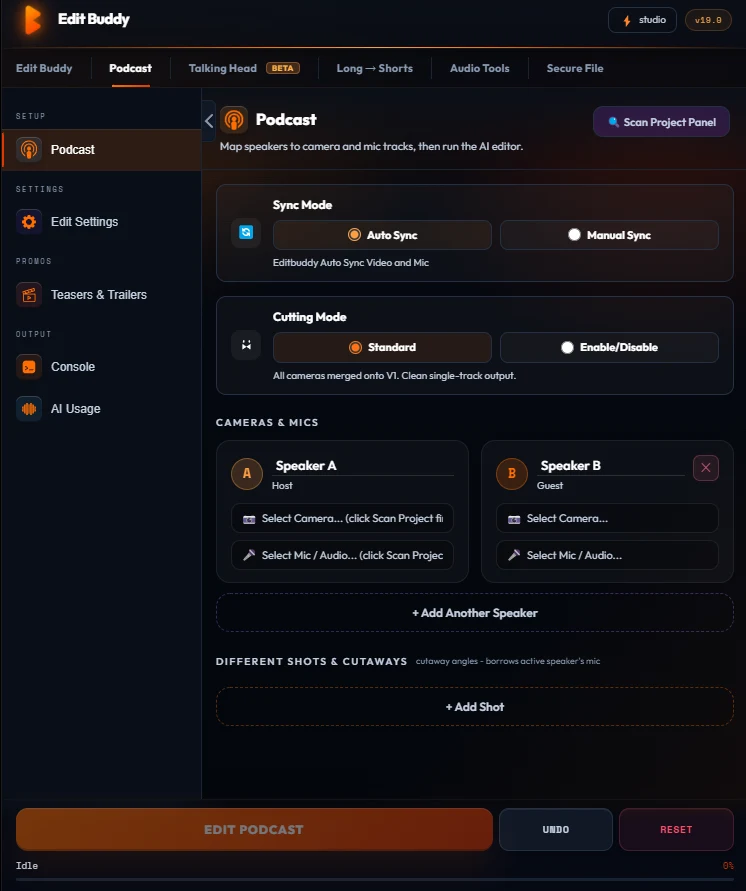
The podcast pipeline lives in one panel
No round-trip, no second app. The Podcast tab sits next to your timeline: map each speaker once, and every future episode reuses the setup.
- Up to 8 speakers mapped to V1–V8 and A1–A8
- Sync offset read from the timeline — no clapper required
- Wide-shot frequency and hold times are configurable per show
- Captions land on V4 after switching, so cuts and captions stay in sync
Ship podcast episodes weekly without burnout
Free — one Auto Edit on a 3-min clip — no card. Installs in under a minute.
Install FreeFrequently asked questions
How many speakers does EditBuddy support?
Up to 8 speakers. Each gets their own video and audio track. Two-camera podcasts and panel discussions are both first-class.
Do I need to sync clips before importing?
No. EditBuddy reads the timeline-derived offset between each mic and its camera and syncs automatically.
Can I use a wide shot in addition to close-ups?
Yes. "Different Shots" mode adds a wide used at the start and at configurable intervals.
Will it handle dead air at the top of the episode?
Yes. An optional intro-trim pass detects dead air at the top and trims it before the first line.
Can I make shorts from my podcast?
Yes. Run the podcast pipeline first to lock the multi-cam edit, then run Long → Shorts to extract viral clips with auto-reframe and captions.
What about Riverside or Squadcast recordings?
If your recording tool exports per-track audio + video, EditBuddy works with it. Drop the tracks on V1–V8 and A1–A8 and map them.
Start your first podcast edit free
Download EditBuddy and edit your first 60 minutes free. Or order a done-for-you podcast edit for $100 — full episode + 2 Shorts + 2 highlights.