2x your editor output, without 2x the headcount
Agency margins live and die on editor time. EditBuddy automates the repetitive 80% of every project — silence, retakes, captions, B-roll, podcast multi-cam, shorts — so each editor can deliver more, with the same quality, in the same tools.
What you save per project
For a studio shipping 20 deliverables a week, that's a freed-up FTE you can either pocket as margin or redirect to higher-value work (color, sound design, motion).
Handle 3x the client volume with AI
EditBuddy automates the time-intensive parts — silence, retakes, captions, B-roll — so your editors focus on creative work. Used by video editing agencies worldwide.
View Pricing →What agencies get from EditBuddy
Same Premiere, no retraining
Editors keep using the tools they know. EditBuddy is a panel, not a replacement. Onboarding is 10 minutes, not 10 weeks.
Backup sequences
Every destructive edit creates a backup. Client revisions don't mean re-importing the project from scratch.
Multi-device licensing
Each Pro license covers multiple machines. Volume pricing for 5+ editors — contact us.
Footage stays local
Original client footage never leaves the editor's machine. Only minimum extracted data goes to AI providers.
Fast turnaround on shorts
One long-form deliverable becomes 5–10 social clips for the same client, without billing extra editor time.
Consistency across editors
Same caption styles, same silence thresholds, same B-roll quality bar — set once, applied across the team.
The same panel on every workstation
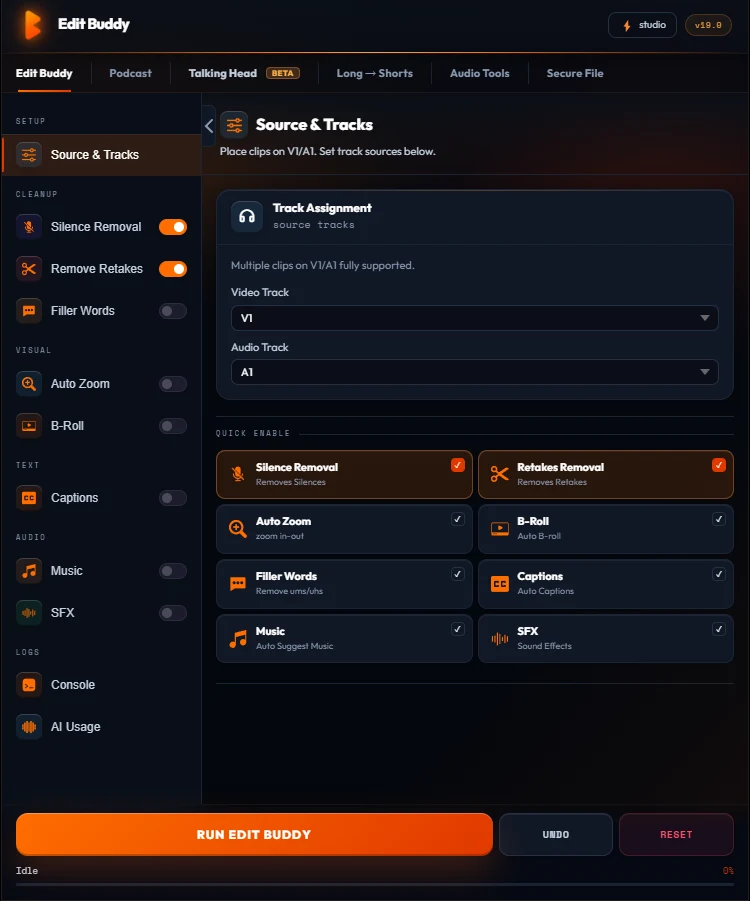
EditBuddy docks as a CEP panel inside the Premiere your editors already run. No new NLE to learn, no project migration — the pipeline is a button in the workspace.
- Onboarding in minutes — it's a panel, not a new editor
- Backup sequence before every destructive pass — revision-safe
- Client footage stays on the workstation; only minimum extracted data goes to AI providers
- Shared defaults — caption styles and thresholds applied consistently across the team
Want a team trial?
Email [email protected] with your editor count. We'll set up trial licenses for your team and walk you through the onboarding.
Or install free firstFrequently asked questions
Can multiple editors share an EditBuddy team license?
Pro plans support multiple devices per license. For studios with 5+ editors, contact [email protected] for volume pricing.
Does EditBuddy guarantee my client's footage stays private?
Original footage stays on the editor's machine. AI features send only minimum extracted data (compressed audio, low-res frames) to vetted providers. See the Security page for details.
How does EditBuddy handle revisions?
A backup sequence is created before any destructive edit. If the client asks for the original cut back, you switch sequences in one click — no re-import needed.
Can we use it on agency-owned hardware?
Yes. EditBuddy installs as a Premiere CEP panel — works on any Windows or Mac workstation running Premiere Pro 2022+.
Can we get a custom DPA?
Yes. Contact [email protected] for our standard DPA or to negotiate custom terms.
Or outsource overflow work to EditBuddy's team
When client volume spikes, EditBuddy's editing service handles overflow at $8-$100 per deliverable. Same AI quality your editors use, delivered in 48 hours.