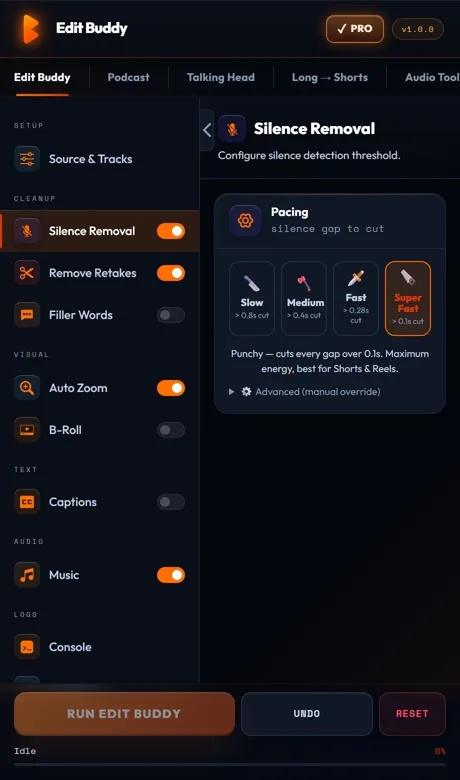
EditBuddy removes dead air from podcast recordings in Premiere Pro by scanning every mic track (A1–A8) at once and only cutting moments when every speaker is silent. A 90-minute episode that takes 4 hours to clean by hand finishes in roughly 15 minutes — and cameras on V1–V8 stay locked in sync.
Silence removal for podcasts — cut dead air across every mic at once
Manual ripple-deleting on a 4-mic podcast means cutting the same gap four times and praying everything stays in sync. EditBuddy does it in one pass, across every speaker track, with the cameras locked.
Why podcasts are harder than solo videos
A talking-head video has one mic. A podcast has two to eight. That changes the silence problem completely.
Silence on one mic isn't silence in the episode
If the host stops to drink water but Guest 2 is mid-sentence, you can't cut that region. Single-track silence tools (including Premiere's built-in detector) wreck multi-speaker recordings because they cut whenever any one mic goes quiet.
Mic bleed creates false positives
Faint room tone bleeding from the guest mic onto the host mic looks like speech to amplitude-only detectors. EditBuddy's cross-track logic ignores bleed and only counts a track as active when there's real intelligible speech on it.
Cross-talk silences need to stay
When two people stop together for a beat (a laugh ending, a thought landing), that beat is part of the rhythm. The default 700 ms minimum gap is tuned for conversational pacing so genuine beats survive while real dead air gets cut.
Ripple has to stay locked across V1–V8
Each speaker often has their own camera angle on V1, V2, V3. Cuts have to ripple every video track plus every audio track together. EditBuddy commits a single timeline mutation through Premiere's API so nothing drifts.
The real time math: 90-minute episode
Honest numbers from real podcast editors who switched to EditBuddy.
Manual: ~4 hours
Solo-scrub each of 4 mic tracks at 1.5x speed = roughly 60 minutes per track times careful ripple-delete pace. Add re-sync checks every 10 minutes. Add the inevitable "wait, did I just cut Sara mid-sentence" rewinds. Four hours is generous.
AutoPod or FireCut on a single mixdown: ~45 minutes
Faster than manual, but you lose multi-track safety. Editors typically spend 30–40 minutes re-checking the mixdown timeline against individual stems for false cuts. Decent for solo shows, fragile for 3+ speakers.
EditBuddy podcast preset: ~15 minutes
3 minutes to scan, 1 minute to commit cuts, 10 minutes to scrub-review the result. Backup sequence auto-created if anything needs reverting. Most editors do 2 episodes per hour after the first week.
Try the podcast preset free
Install EditBuddy and clean your first podcast episode free. No credit card. Installs as a Premiere Pro panel in under a minute on Windows.
Install EditBuddy →How the cross-track silence detector works
Three checks run together. A region is only cut if it passes all three.
1. Per-mic amplitude check
Every selected mic track (A1 through A8) is scanned independently. Each track gets its own "is this mic silent right now?" verdict based on the podcast threshold (default -38 dB, adjustable for noisy rooms or quiet whisperers).
2. Cross-track agreement
A region only counts as cuttable when every active speaker mic is silent at the same time. If Host is silent but Guest 1 is talking, the region stays. This is the safety net single-track tools don't have.
3. Minimum-gap filter
Cross-track silences shorter than your minimum gap (default 700 ms) are kept. This preserves laughter beats, "okay so..." pauses, and the natural conversational rhythm that makes a podcast feel human instead of robotic.
Compared to other podcast silence tools
Honest take on where each tool actually wins.
AutoPod
Best-in-class for multicam camera switching. Their silence handling is decent but works track-by-track, so multi-speaker recordings need careful threshold tuning and a manual review pass. Pair EditBuddy (silence first) + AutoPod (switching after) and you get the best of both.
FireCut
Excellent for single-speaker talking-head and short-form. Their podcast support has improved but the cross-track logic isn't as aggressive about preserving non-silent moments on other speakers. Solid choice for solo podcasts.
Descript
Great editor, but it's not Premiere Pro. You have to round-trip XML, lose effects, and re-do color grading. Fine for podcast-only shows. Painful if you also need to keep your existing Premiere workflow for the video version.
EditBuddy
Native Premiere panel. Multi-track-aware silence detection built specifically for podcast recordings. Pairs with auto-captions, retake detection, and shorts extraction in the same panel. Backup sequence on every destructive edit.
EditBuddy is not affiliated with Adobe, AutoPod, FireCut, or Descript. All trademarks belong to their respective owners.
Stop cutting the same gap four times
EditBuddy's podcast preset handles every mic track in one pass. Installs as a Premiere Pro panel. First episode free.
Install EditBuddy →Frequently asked questions
Why is silence removal harder for podcasts than solo videos?
A podcast has 2 to 8 mic tracks recorded simultaneously. Silence on one mic doesn't mean silence in the episode — someone else may be talking. EditBuddy only cuts moments where every active speaker mic is below threshold together, so you never lose a sentence.
How long does it take to clean a 90-minute podcast?
Roughly 12 to 18 minutes of total wall-clock time, most of which is automatic. Compare that to 3 to 5 hours of manual ripple-deleting across 4 speaker tracks if you do it by hand.
Will my linked cameras stay in sync after silence removal?
Yes. EditBuddy commits cuts through Premiere Pro's own timeline API, so cameras on V1 to V8 ripple in lockstep with their linked mic tracks. No drift, no manual nudging.
Does it work with Riverside, Squadcast, and Zencastr exports?
Yes. Drop the individual speaker WAV/MP3 files from any remote recording platform onto separate audio tracks in your sequence. EditBuddy treats them as independent speaker mics automatically.
Can it cut bleed and cross-talk silences without killing natural pauses?
Yes. The minimum-gap setting (default 700 ms) preserves natural beats. Bleed is handled by the cross-track check — a clip with quiet bleed but no actual speech reads as silence on its own mic and gets cut even if another mic picks up faint room tone.
Does it work with mono podcast mixdowns instead of individual tracks?
Yes, but you lose the cross-speaker safety net. We recommend keeping individual mic stems on separate tracks for podcasts longer than 30 minutes — it catches edge cases the mixdown buries.
Will it work alongside AutoPod or FireCut?
Yes. AutoPod handles camera switching, FireCut handles single-track silence. EditBuddy's podcast-aware silence pass plays nicely with either — most editors run EditBuddy first to clean the audio, then AutoPod for switching.
Don't have time? We'll edit your podcast for you.
EditBuddy's done-for-you service edits full podcast episodes — silence, retakes, fillers, multicam switching — from $100/episode with 48-hour turnaround.
Hire EditBuddy →