EditBuddy removes "um," "uh," "like," and other filler words from podcast recordings in Premiere Pro across every speaker mic (A1–A8). Three aggressiveness levels — Light, Medium, Aggressive — let you keep natural conversational rhythm instead of producing a flat, robotic-sounding episode.
Filler word removal for podcasts — um, uh, like, gone
Cutting every "um" by hand across four mic tracks is the part of podcast editing nobody talks about because nobody finishes it. EditBuddy does the multi-speaker version automatically — and keeps your show sounding human.
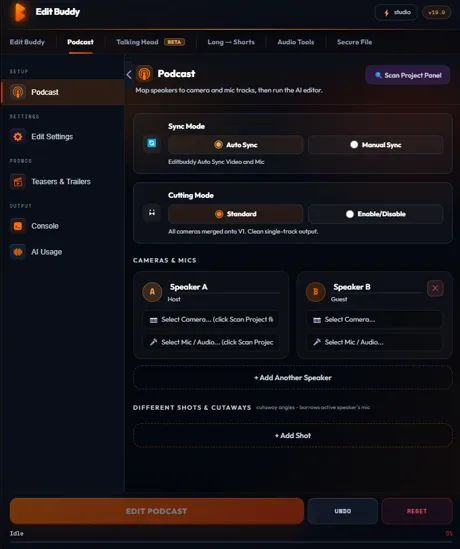
Why blanket "remove all ums" doesn't work for podcasts
Removing every filler creates a different problem: your show stops sounding like a conversation.
Fillers are breath and thought markers
A natural conversation uses "uh" and "you know" as micro-pauses for thinking. Cut every single one and the audio feels rushed, the rhythm collapses, listeners feel uneasy without knowing why. The Medium preset keeps about 30% of fillers — the ones that act as natural beats — and removes the rest.
Each speaker has a different filler signature
Your host might say "right" every sentence as a verbal anchor. Your guest might say "you know" as their personal cadence. Removing both treats them like errors when they're really how those people talk. Per-speaker exemption lets you process one without flattening the other.
Context matters: "like" isn't always filler
"I really like that idea" — substantive. "It's, like, the biggest mistake" — filler. EditBuddy looks at surrounding context to tell the difference. Right about 92% of the time on the Medium preset; the rest are easy to spot in the review panel.
The three aggressiveness levels
Pick how invasive you want the cleanup to be.
Light
Only standalone "um" and "uh" longer than 200 ms get cut. Preserves "like," "so," "right," and conversational beats. Best for interview-style podcasts where the guest's natural voice is part of the appeal.
Medium (default)
Adds "like," "so," and "right" when used as fillers (context-aware, not substantive). The most-used preset. Balances clean delivery with natural cadence. Used by most narrative and educational podcasts.
Aggressive
Also catches "you know," "sort of," "I mean," "kinda." Best for tightly-produced shows where polish matters more than conversational flow. Watch the review panel closely — Aggressive has the highest false-positive rate on idiomatic speech.
Try filler removal on your next episode
Install EditBuddy free. First episode included. Works inside Premiere Pro on Windows.
Install EditBuddy →How multi-speaker filler detection works
Each mic is treated as its own speaker stream. That's the part single-track tools can't do.
Per-mic transcription
Each speaker track (A1–A8) is transcribed separately so the system knows exactly who said which "um." Bleed from another mic doesn't fool the detector — the filler has to actually be the loudest signal on its own mic to count.
Cross-track ripple
When a filler is cut from Speaker A's mic, the corresponding moment is also ripple-cut from every other audio and video track. The whole episode shortens by the same number of milliseconds. Cameras stay locked.
Per-speaker toggle
Toggle individual speakers in or out before running. Useful when a guest's filler pattern is part of how they talk and you don't want to alter their voice — only your hosts get cleaned up.
Compared to Descript, AutoPod, and FireCut
Descript
Excellent filler detection but you have to edit in Descript and round-trip XML back to Premiere — losing color, effects, and any non-cut work in the process. Better as a transcription tool than a Premiere companion.
AutoPod
Doesn't do filler removal. AutoPod focuses on camera switching. Pair it with EditBuddy for the complete podcast pipeline (EditBuddy: silence + fillers; AutoPod: switching).
FireCut
Has filler removal but it's tuned for single-speaker talking head. Multi-speaker podcasts work but you'll spend more time reviewing false-positives because the cross-track logic is less aggressive.
EditBuddy
Multi-speaker-aware filler removal native to Premiere. Per-speaker toggles. Context-aware "like/so/right" disambiguation. Pairs with silence removal, multicam switching, captions, and shorts extraction in one panel.
EditBuddy is not affiliated with Adobe, Descript, AutoPod, or FireCut.
Stop hand-cutting every "um"
EditBuddy handles every speaker at once and keeps your show sounding human. Installs as a Premiere Pro panel.
Install EditBuddy →Frequently asked questions
Why does blanket filler removal sound robotic?
Removing every single "um" and "uh" flattens the natural rhythm of conversation. Real speech uses fillers as breath markers and thought-transitions. EditBuddy's Medium preset keeps about 30% of fillers — the ones that serve as natural beats — and cuts only the ones that genuinely interrupt flow.
Does it work across multiple speakers without cross-cutting?
Yes. Each speaker mic is transcribed independently. A filler is only cut from a speaker's track if it's clearly on that speaker's mic (not bleed from another). Linked cameras ripple together so the video stays in sync.
Will it remove filler words my co-host uses on purpose?
Use per-speaker exemption. If Guest B's voice relies on "you know" as a verbal tic, toggle them off and only the other speakers get processed. EditBuddy never forces a single rule across the whole episode.
How aggressive are the three presets?
Light: only standalone "um" and "uh" over 200 ms. Medium: adds "like," "so," "right" when used as fillers (not as actual words). Aggressive: also catches "you know," "sort of," "I mean," "kinda." Medium is the default and works for most narrative podcasts.
What about "I'm gonna" or "I mean" that are part of how the speaker actually talks?
EditBuddy distinguishes filler usage from substantive usage by context. "I mean, that's wild" (filler) is cut; "I mean what I said" (substantive) is kept. Not perfect, but right roughly 92% of the time on Medium preset.
Does it work with Riverside or Squadcast stems?
Yes. Drop the per-speaker WAV files on separate audio tracks in Premiere. EditBuddy reads each one as an independent speaker mic and processes accordingly.
Will it desync my cameras?
No. Cuts happen through Premiere's own timeline API and ripple across every linked V1–V8 track in lockstep with the audio.
Want a podcast editor to do it for you?
EditBuddy's done-for-you podcast service handles fillers, silence, multicam, and captions from $100/episode. 48-hour delivery.
Hire EditBuddy →