Download EditBuddy
The AI video editor that lives inside Adobe Premiere Pro. Cut silences and retakes, add captions and b-roll, and edit hours of footage in minutes — without ever leaving your timeline.
Detecting your system…
Windows 10 & 11 · 64-bit
Apple Silicon · M1–M4
We’re putting the finishing touches on the macOS build. Drop your email and we’ll send you the download link the day it’s ready — you’ll be first in line.
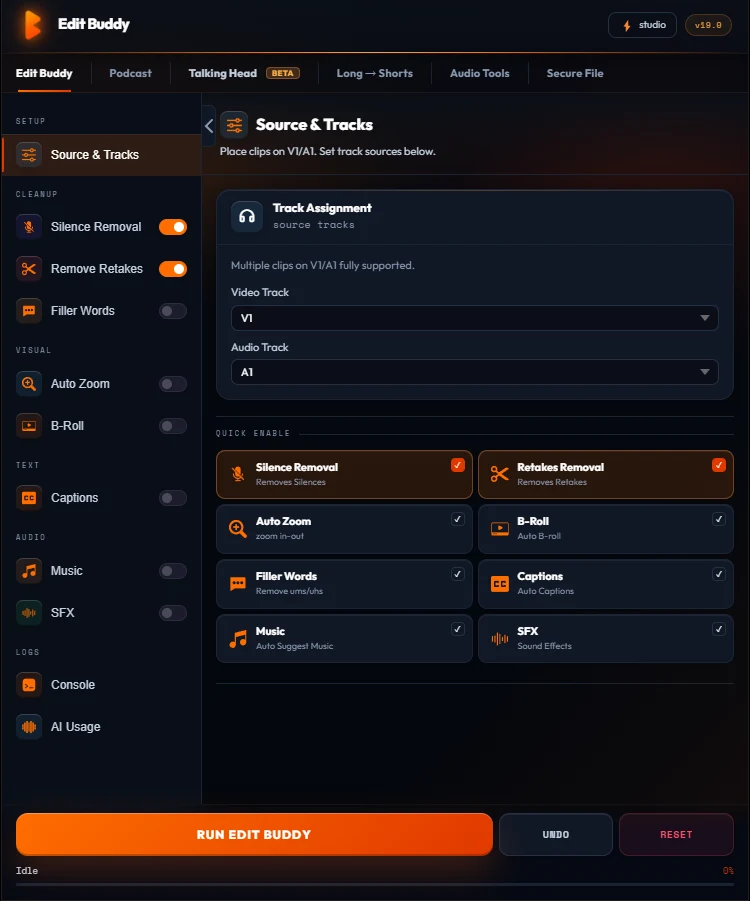
One panel, every tool
EditBuddy docks inside Premiere Pro like any native panel — no uploads, no separate app, no round-tripping your footage through a browser.
- Silence, retakes & filler words cut straight on your timeline
- Captions & AI B-roll matched to what you're actually saying
- Podcast multicam, Shorts & highlights from long recordings
- No API key needed — AI routes through EditBuddy's secure proxy
Install in under a minute
No extra tools needed — the installer does everything for you.
Unzip & run
Unzip the download and double-click install.bat. Close Premiere Pro first if it’s open.
It installs itself
The installer copies EditBuddy into Premiere and sets everything up automatically. Takes a few seconds.
Open in Premiere
Restart Premiere Pro, then open Window › Extensions › EditBuddy.
Activate
Sign in with your email & license key, and you’re editing.
If Windows shows a blue “Windows protected your PC” box when you run install.bat, click More info › Run anyway. This is normal for new installer scripts and completely safe. Full guide on the install page.
What you’ll need
EditBuddy runs inside Adobe Premiere Pro as a native extension.
Premiere Pro 2024+
Version 24.0 or newer (CEP 11)
Windows & macOS
Win 10/11 · macOS Apple Silicon
Internet
For AI features & activation
A license
Free trial or a paid plan
Don’t have a license yet?
Start a free trial or pick a plan — you’ll get a license key to activate EditBuddy right after checkout.